> For the complete documentation index, see [llms.txt](https://docs.workfx.ai/llms.txt). Markdown versions of documentation pages are available by appending `.md` to page URLs; this page is available as [Markdown](https://docs.workfx.ai/workfx-1.1.x-english/workforce-factory/agent/flow-based-agent/agent-nodes.md).
# Agent Nodes
## **Introduction to AgentFlow Nodes**
In **AgentFlow**, a workflow is constructed using a series of modular **Nodes**, each representing a discrete function or operation. These nodes are visually connected on the canvas to define the logic, control flow, and data handling of the entire process.Here’s a brief introduction to the main types of **Nodes** in **AgentFlow**:
### **Basic**
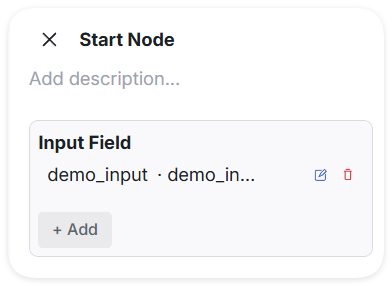
* **Start Node**
{% columns %}
{% column width="41.66666666666667%" %}
{% endcolumn %}
{% column %}
* **Function**
Serves as the default and fixed entry point for any workflow-based agent. It is automatically created when a new workflow is initialized.
* **Configurable Parameters**
Users can define additional custom input variables as needed to support downstream logic.
* **Input**
Always receives the user's query by default. Also accepts any additional user-defined input variables.
* **Output**
Passes the received query and input variables to subsequent connected nodes for further processing.
{% endcolumn %}
{% endcolumns %}
***
* **End Node**
{% columns %}
{% column width="41.66666666666667%" %}
{% endcolumn %}
{% column %}
* **Function**\
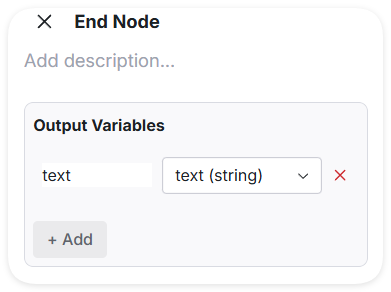
Serves as one of the possible termination points in a workflow-based agent. It collects and outputs results from preceding nodes for final use, external return, or logging.
* **Configurable Parameters**\
Users can define custom output variables to export selected values. These values are typically references to outputs from previous nodes.
* **Input**\
Receives data from one or more connected upstream nodes. The data may include intermediate results or values computed earlier in the workflow.
* **Output**\
Exports the specified output variables. Only variables explicitly defined by the user will be included in the final result.
{% endcolumn %}
{% endcolumns %}
***
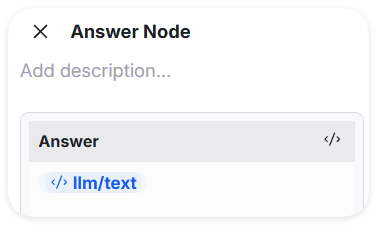
* **Answer Node**
{% columns %}
{% column width="41.66666666666667%" %}
{% endcolumn %}
{% column %}
* **Function**\
Serves as a conversational termination point in a workflow, typically used in Chat Flow scenarios. It outputs a natural language response to the user, allowing dynamic embedding of upstream variables. It cannot coexist with an End Node in the same workflow.
* **Configurable Parameters**\
Users can define a response template using natural language, where variables from preceding nodes can be embedded using placeholders .
* **Input**\
Receives data from one or more upstream nodes, including all referenced variables intended for insertion into the final response.
* **Output**\
Generates a natural language response by resolving variable references within the defined template. The response is returned directly to the user as the final message of the workflow.
{% endcolumn %}
{% endcolumns %}
***
**Transform**
* **Code Node**
* **Function**\
Executes custom Python code as part of the workflow. Used for implementing flexible logic, data processing, or integration tasks that require scripting.
* **Configurable ParametersInput Variables**: Passed into the code as function parameters.**Output Variables**: Returned as a dictionary where keys are variable names available to downstream nodes.
* **Input**\
Receives values from upstream nodes corresponding to the user-defined input variable names. These are passed as arguments to the code function.
* **Output**\
Return a dictionary containing one or more key-value pairs. Each key represents an output variable name, which can be used by downstream nodes.A typical example is as follows:
{% code fullWidth="false" %}
```python
def main(input_text1: str, input_text2: str) -> dict:
combined_text = input_text1 + " " + input_text2
length = len(combined_text)
return {
"combined_text": combined_text,
"text_length": length
}
```
{% endcode %}
This function `main` takes two input strings, `input_text1` and `input_text2`. It concatenates them with a space in between to form `combined_text`. Then, it calculates the length of this combined string and stores it in `text_length`. Finally, the function returns a dictionary containing both the concatenated result and its length as output variables.
***
**Control Flow**
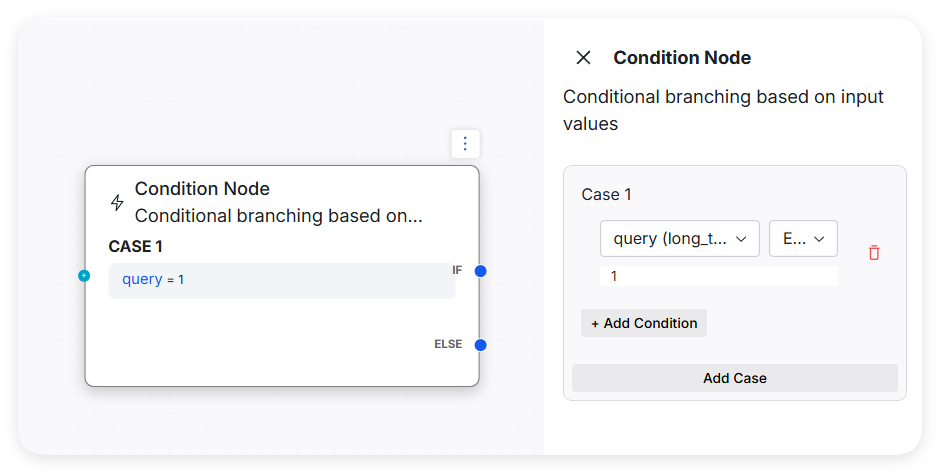
* **Condition Node**
*
```
* **Function**
```
```
Directs the workflow based on conditional logic. It evaluates one or more user-defined conditions and determines which downstream branch to execute accordingly.
* **Configurable Parameters**
* A **referenced variable** (from upstream nodes)
* A **logical expression** (e.g., `==`, `>`, `in`, etc.)
* An associated **output branch** (executed if the condition is true) Branches are evaluated in order. Only the first true condition's branch is executed. An optional `else` branch can be defined as a fallback.
* **Input**
Receives variables from upstream nodes that are used in condition evaluations.
* **Output**
Executes the branch corresponding to the first condition that evaluates to true. If none match and an `else` branch is defined, the `else` branch is executed.
```
***
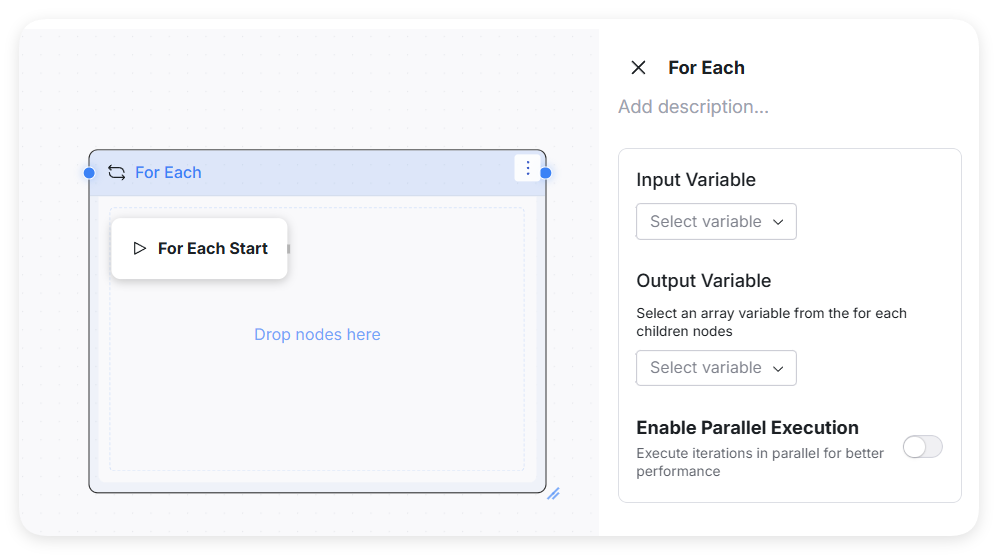
* **For Each Node**
* * **Function**:\
Iterates over an input array and repeatedly executes the nodes within a defined loop boundary.
* **Structure**:
* A fixed entry node: **For Each Start**
* A loop boundary box: drag any nodes into this area to make them part of the loop body
* **Usage**:
* Drag nodes from the node list into the loop area
* Set the **Input Variable** (must be of **Array** type)
* Set the **Output Variable** (must be the output from within the loop scope.)
* **Execution Logic**:
* Automatically iterates through the array
* Provides two built-in variables to nodes inside the loop:
* `for_each_index`: the index of the current item
* `for_each_value`: the value of the current item
* **Optional Setting**:
* **Parallel Execution**: Enable this option for loops without inter-item dependencies to improve performance.
***
* **Variable Assigner Node**
{% columns %}
{% column width="41.66666666666667%" %}
{% endcolumn %}
{% column %}
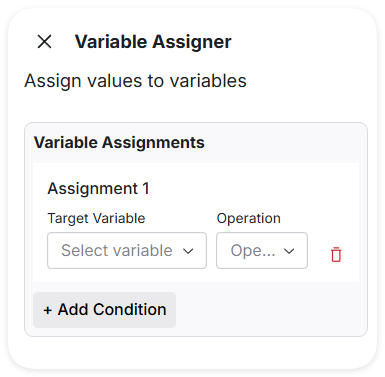
* **Function**:\
Sets or updates globally accessible variables within the workflow. Supports both assignment and reset operations, enabling dynamic runtime behavior based on changing context.
* **Configurable Parameters**:
* **Target variable**: The name of the global or referenced variable to modify
* **Assignment value**: A constant, expression, or variable reference to assign
* **Operation type**:
* `assign`: Assign a new value to the variable
* `reset`: Clear or reset the variable to its default state
* Multiple variable operations can be configured in one node
* **Input**:\
Receives variables or context from upstream nodes as sources for assignment.
* **Output**:\
Passes the updated variables to downstream nodes for use in subsequent steps.
{% endcolumn %}
{% endcolumns %}
* **Human Review Node**
* **Function**
Pauses the automated workflow and sends a message to a designated human reviewer for manual decision-making. Based on the reviewer’s selection, the workflow proceeds along a specified branch.
* **Configurable Parameters**
* **Review Message**: A customizable message presented to the reviewer to explain the context and request input.
* **Human Review Type**: Specifies the review format (e.g., single choice, multi-choice, comment).
* **Options**: A list of selectable options, each including:
* **Option Name**: A label for the option (e.g., "Approve", "Reject").
* **Option Description**: An optional description to help the reviewer understand what the option means.
* **Reviewer Role**: Defines which user group or role is authorized to perform the review.
* **Input**
Receives all necessary variables and context from upstream nodes to assist the reviewer in making a decision.
* **Output**
The selected option is returned as an output variable and determines the next step in the workflow, typically branching based on the review result.
***
**AI Models**
* **LLM Node**
* **Function**
* Integrates a Large Language Model (LLM) into the workflow to generate natural language responses, perform text understanding, summarization, translation, or other NLP-related tasks based on provided input variables. Enables conversational AI, content generation, or intelligent decision support.
* **Configurable Parameters**
* **System Prompt** A fixed or semi-fixed instruction that provides context or role setting for the LLM, guiding its response style and behavior (e.g., "You are a helpful assistant.")
* **User Prompt** A dynamic prompt template that incorporates input variables to form the actual query sent to the LLM.
* **Model Settings** Parameters like temperature, max tokens, top-p, frequency penalty, presence penalty, etc., to control output randomness, length, and style.
* **Input Variables** Variables from upstream nodes used to fill placeholders in the User Prompt.
* **Output Variables** Variables that store the LLM’s generated responses for downstream processing.
* **Input**
* Receives input variables from previous nodes, which are injected into the User Prompt template to produce the final query for the LLM.
* **Output**
* Returns generated text(s) or structured response(s) from the LLM, mapped to output variables for further use or display.
***
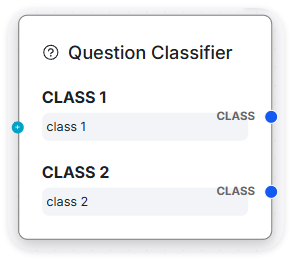
* **Question Classifier Node**
{% columns %}
{% column width="41.66666666666667%" %}
{% endcolumn %}
{% column %}
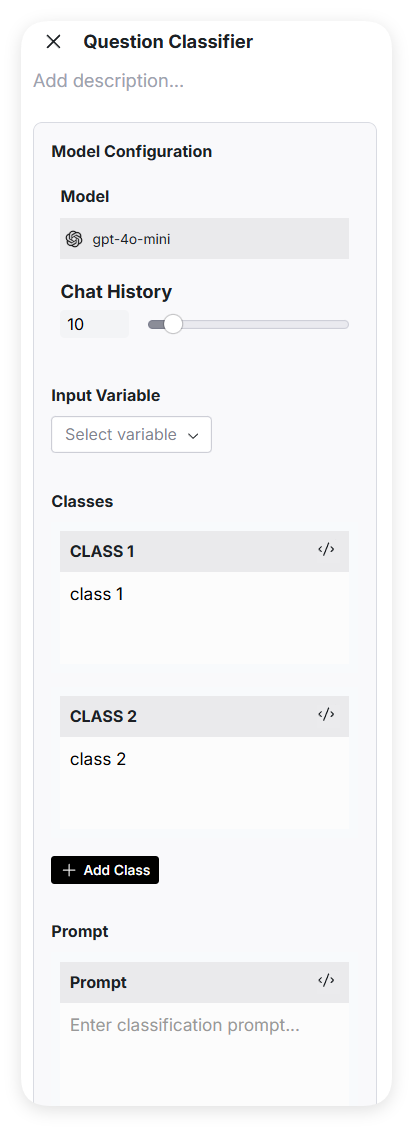
* **Function**:\
Classifies user input into predefined categories to guide downstream workflow branching based on intent.
* **Configurable Parameters**:
* **Model**: The language model used (e.g., GPT-4o-mini)
* **Chat History**: Whether to include prior conversation context
* **Class List**: Custom category labels defined by the user; each class maps to an output branch
* **Prompt**: The classification prompt used to guide the model's decision. Leaving it blank is also allowed.
* **Input Variables**: The input field to be classified, usually the user’s query (e.g., `User Query`)
{% endcolumn %}
{% endcolumns %}
***
* **Agent Node**
* **Function**
* Allows invoking another pre-built agent as a node within the current workflow. This supports modular reuse of existing logic and enables hierarchical or nested workflow designs.
* **Configurable Parameters**
* **Agent Reference** Select or input the ID/name of the existing agent to be invoked.
* **Input Variables** Define the variables to be passed into the referenced agent. These should match the input schema expected by that agent.
* **Input**
* Receives variables from upstream nodes and passes them as input to the specified agent.
* **Output**
* Returns the predefined output variables of the referenced agent. These outputs are automatically exposed for use in subsequent nodes.
**Knowledge**
{% columns %}
{% column width="41.66666666666667%" %}
{% endcolumn %}
{% column %}
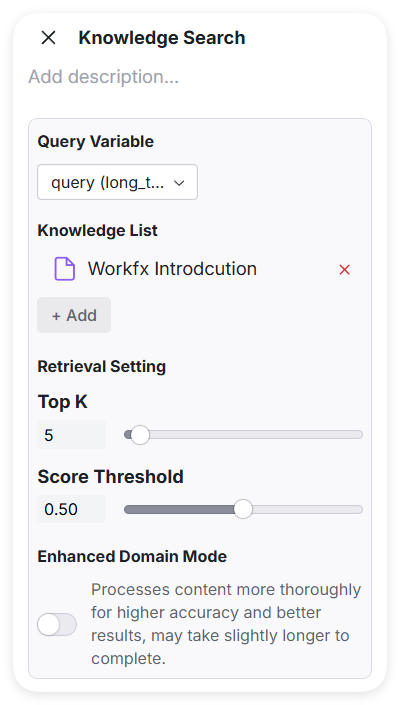
**Knowledge Search Node**
* **Function**
Retrieves relevant information from a specified knowledge database based on user-defined input variables. Typically used to provide external knowledge support for downstream reasoning or generation.
* **Configurable Parameters**
* **Knowledge Database** Select the knowledge base to search from (e.g., FAQ base, product manual, research corpus).
* **Input Variables** Specify the variables whose values will be used as search queries.
* **Top K** Set the maximum number of results to return from the knowledge base.
* **Score Threshold** Define the minimum similarity score required for a result to be included.
* **Input**
Receives search query inputs (usually from upstream node outputs or user inputs), which are used to query the selected knowledge base.
* **Output**
Returns a list of relevant knowledge entries, each typically including fields like `content`, `source`, and `score`. This list is passed to downstream nodes.
{% endcolumn %}
{% endcolumns %}
***
**Tool**
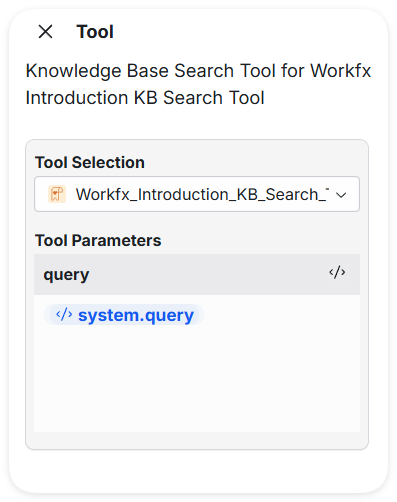
* **Tool Node**
{% columns %}
{% column width="41.66666666666667%" %}
{% endcolumn %}
{% column %}
* **Function**
Enables integration of external tools within a workflow. Users can either select from built-in tools provided by the platform or use custom tools they have created. The Tool Node extends workflow capability with specialized processing.
* **Configurable Parameters**
* **Tool Selection** Choose a tool from the built-in library or link a user-defined tool.
* **Tool-Specific Configuration** Configuration options vary depending on the selected tool. Each tool may define its own required input variables, output structure, and runtime parameters.
* **Input**
Receives input variables required by the selected tool. These are usually mapped from upstream node outputs.
* **Output**
Returns the output as defined by the tool's specification. Output variables are exposed for use in downstream nodes.
{% endcolumn %}
{% endcolumns %}
***
---
# Agent Instructions
This documentation is published with GitBook. GitBook is the documentation platform designed so that both humans and AI agents can read, navigate, and reason over technical content effectively. Learn more at gitbook.com.
## Querying This Documentation
If you need additional information that is not directly available in this page, you can query the documentation dynamically by asking a question.
Perform an HTTP GET request on the current page URL with the `ask` query parameter, and the optional `goal` query parameter:
```
GET https://docs.workfx.ai/workfx-1.1.x-english/workforce-factory/agent/flow-based-agent/agent-nodes.md?ask=&goal=
```
`ask` is the immediate question: it should be specific, self-contained, and written in natural language.
`goal` is optional and describes the broader end goal you are ultimately trying to accomplish on behalf of the user. GitBook uses it to tailor the answer towards what is most useful for that goal.
The response will contain a direct answer to the question and relevant excerpts and sources from the documentation.
Use this mechanism when the answer is not explicitly present in the current page, you need clarification or additional context, or you want to retrieve related documentation sections.