> For the complete documentation index, see [llms.txt](https://docs.workfx.ai/llms.txt). Markdown versions of documentation pages are available by appending `.md` to page URLs; this page is available as [Markdown](https://docs.workfx.ai/workfx-1.1.x-english/workforce-factory/multi-agent/supervisor.md).
# Supervisor
## Supervisor Node
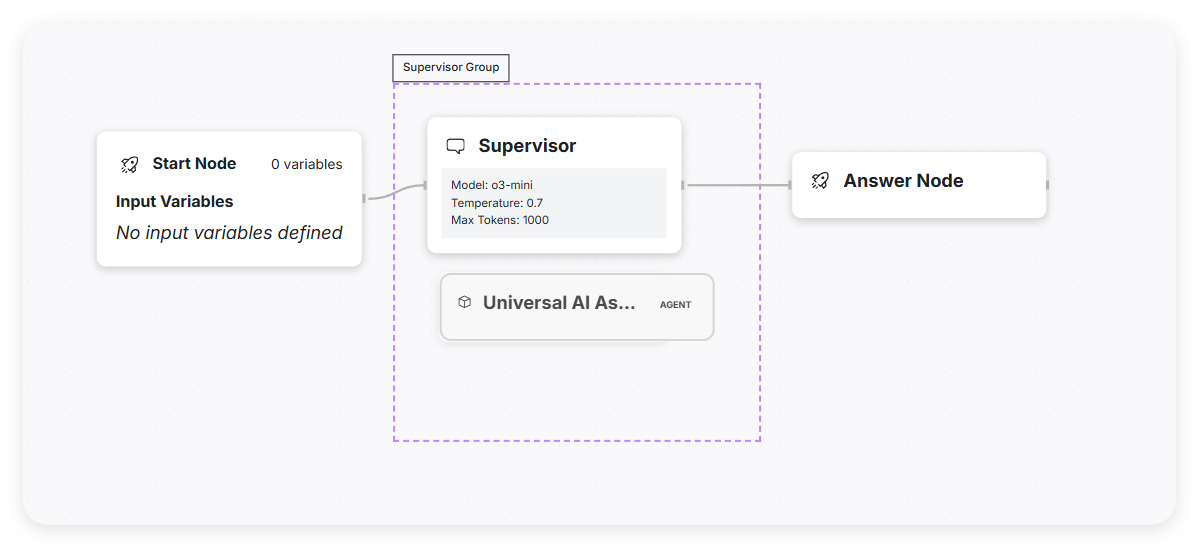
As the agent responsible for managing the overall workflow and delegating tasks to appropriate worker agents, the Supervisor maintains an organizational structure known as the **Supervisor Group**.
To ensure the Supervisor functions properly, users need to add other published agents into the **Orchestration** system and assign them to the **Supervisor Group** of the corresponding **Supervisor Node**.
* This setup enables the Supervisor Node to freely invoke these agents as needed, facilitating efficient task delegation and collaboration.
* Multiple agents can be added to enhance the Supervisor’s capabilities; however, the number should be kept reasonable to avoid excessive complexity in management and coordination.
* Furthermore, each agent should be capable of independently completing a specific unit of work, ensuring task execution is both efficient and precise.
## Supervisor Prompt
By default, the Supervisor Prompt is designed to guide the supervisor agent to analyze user requests, break them down into multiple sub-tasks, and assign these sub-tasks to worker agents with relevant expertise. Below is a sample default prompt:
You are an intelligent assistant capable of using predefined tools to answer user queries or execute actions.
```
You are an intelligent assistant capable of using predefined tools to answer user queries or execute actions.
When handling user requests, always follow these steps:
Understand User Intent:
Clearly identify the user's goal and extract relevant details from their query.
Select Appropriate Tool:
From your available set of tools, select the one that best matches the user's needs.
Construct a Function Call:
Create a JSON-formatted function call specifying the function name and required parameters accurately.
Process the Response:
Once the function executes, use the returned information to craft a clear, natural-language response for the user.
Make sure you provide correct parameters in the function call and clearly communicate the results returned by the function.
```
---
# Agent Instructions
This documentation is published with GitBook. GitBook is the documentation platform designed so that both humans and AI agents can read, navigate, and reason over technical content effectively. Learn more at gitbook.com.
## Querying This Documentation
If you need additional information that is not directly available in this page, you can query the documentation dynamically by asking a question.
Perform an HTTP GET request on the current page URL with the `ask` query parameter, and the optional `goal` query parameter:
```
GET https://docs.workfx.ai/workfx-1.1.x-english/workforce-factory/multi-agent/supervisor.md?ask=&goal=
```
`ask` is the immediate question: it should be specific, self-contained, and written in natural language.
`goal` is optional and describes the broader end goal you are ultimately trying to accomplish on behalf of the user. GitBook uses it to tailor the answer towards what is most useful for that goal.
The response will contain a direct answer to the question and relevant excerpts and sources from the documentation.
Use this mechanism when the answer is not explicitly present in the current page, you need clarification or additional context, or you want to retrieve related documentation sections.